Publish
Push a branch, and open a pull request if you want one, with no gh and no tokens.
Publish… in the Changes tab's Git menu pushes a branch. By default it just pushes; choose a PR option under How to open a pull request too, with a title and description you write or ask the agent for (the sparkles button).
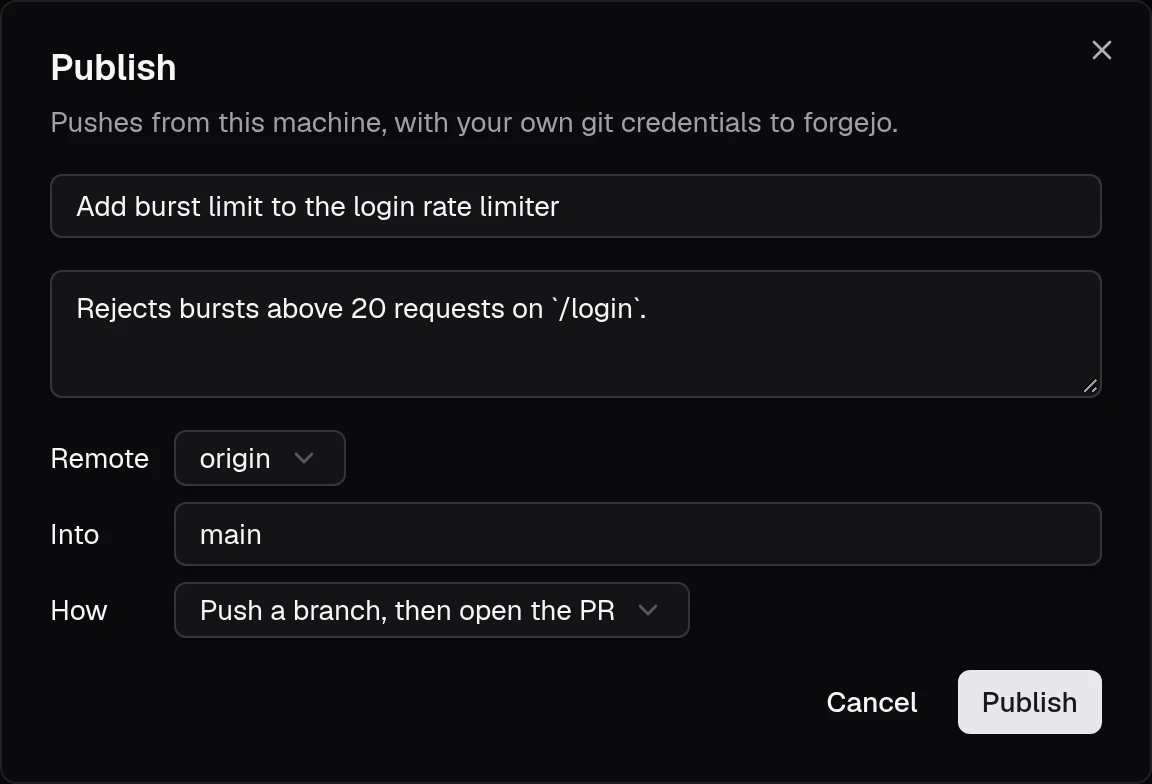
- The push runs on your machine with your own ssh-agent and credential helpers, so pre-push hooks run there too. If the checkout isn't usable on the host, it runs in the container instead.
OPENDEVHUB_PUSH=host|containerforces one. Git never prompts for credentials: a missing one fails the push. - The forge is detected from the remote URL: the
forgesmap inconfig.jsonfirst, then the built-in hosts (github.com,gitlab.com,codeberg.org,bitbucket.org), then a one-time unauthenticated probe of the host's Forgejo/Gitea API. The result is cached inconfig.json; delete the entry to probe again. Unreachable hosts aren't cached. - On Forgejo and Gitea, AGit (
refs/for/<base>) opens the PR with the push itself. Push, then open the PR pushes the branch and links a pre-filled compare page. A plain push links the forge's new-PR page, so you can still open one later. - opendevhub never force-pushes. If the remote branch has commits yours doesn't, pull them and publish again.
Configure a forge
To tell opendevhub about a host, or an ssh alias it can't probe, add it to ~/.config/opendevhub/config.json:
{
  "forges": {
    "git.example.com": { "kind": "forgejo" },
    "work": { "kind": "gitlab", "web": "https://gitlab.example.com" }
  }
}
kind is one of github, gitlab, forgejo, gitea, bitbucket or unknown. web is the site's origin, needed when the remote host is an ssh alias (work:team/app.git).