Forgejo
Browse PRs, hand reviewers' feedback to an agent, or review with AI suggestions.
Forgejo is an optional integration, disabled by default. Open Settings in the sidebar, enable Forgejo, and save your instance URL and access token. Use a token with read:user, read:repository, and read:issue scopes, including access to private repositories you want to see. Use HTTPS; loopback HTTP is supported for local instances.
Use Test connection before saving to verify the API, authenticated account, and read access. Testing uses the entered token, or the saved token when the URL is unchanged, without saving anything.
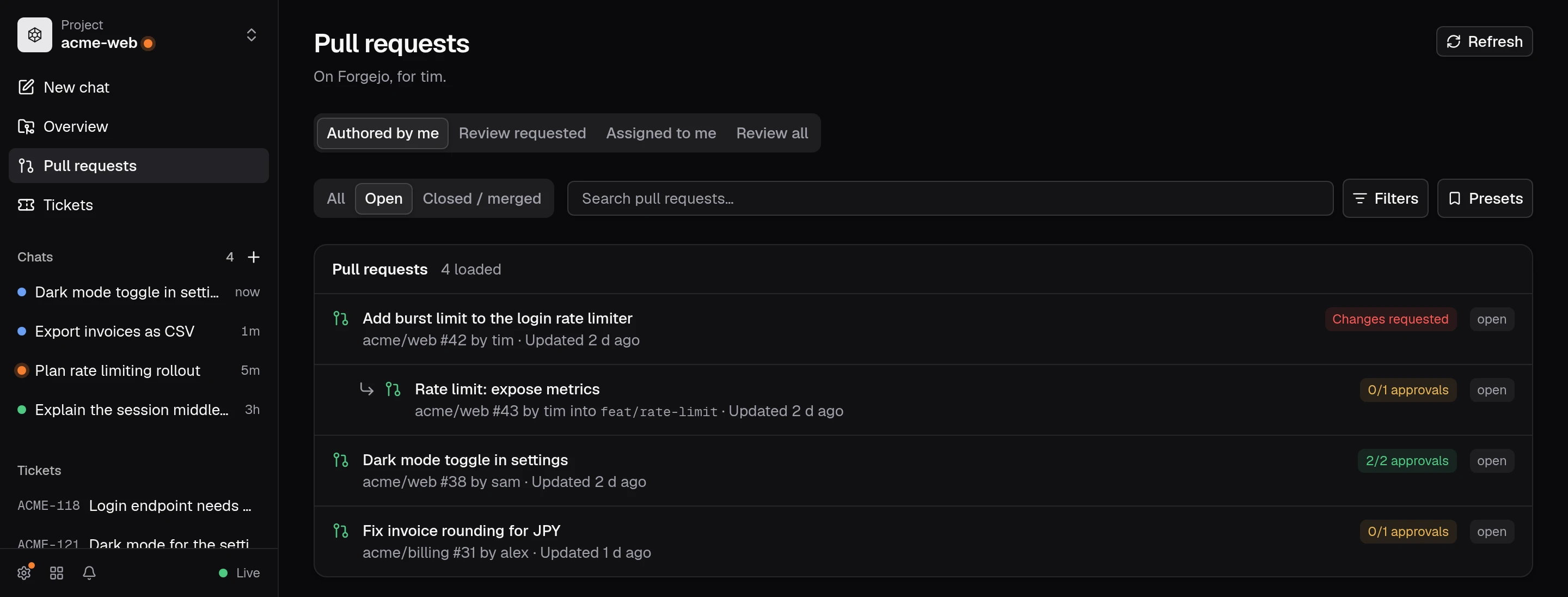
Pull requests in the sidebar opens an inbox with Authored by me, Review requested, and Assigned to me views. Filter by state, author, organisation or team, search PR text, or enter an exact repository as owner/name. Save a useful combination as a named filter preset. Repositories do not need to be local projects. Use Load more pull requests to fetch additional pages. Your selected view and filters are remembered, and returning from a PR preserves them.
Pull request context
Open a PR to see its description, labels, draft/merge status, requested reviewers, discussion, reviews, and CI checks for its head commit. Other people's inline comments appear in the diff at their lines, as long as those lines are still in it. Comments and reviews load in pages; checks link to their upstream details when available.
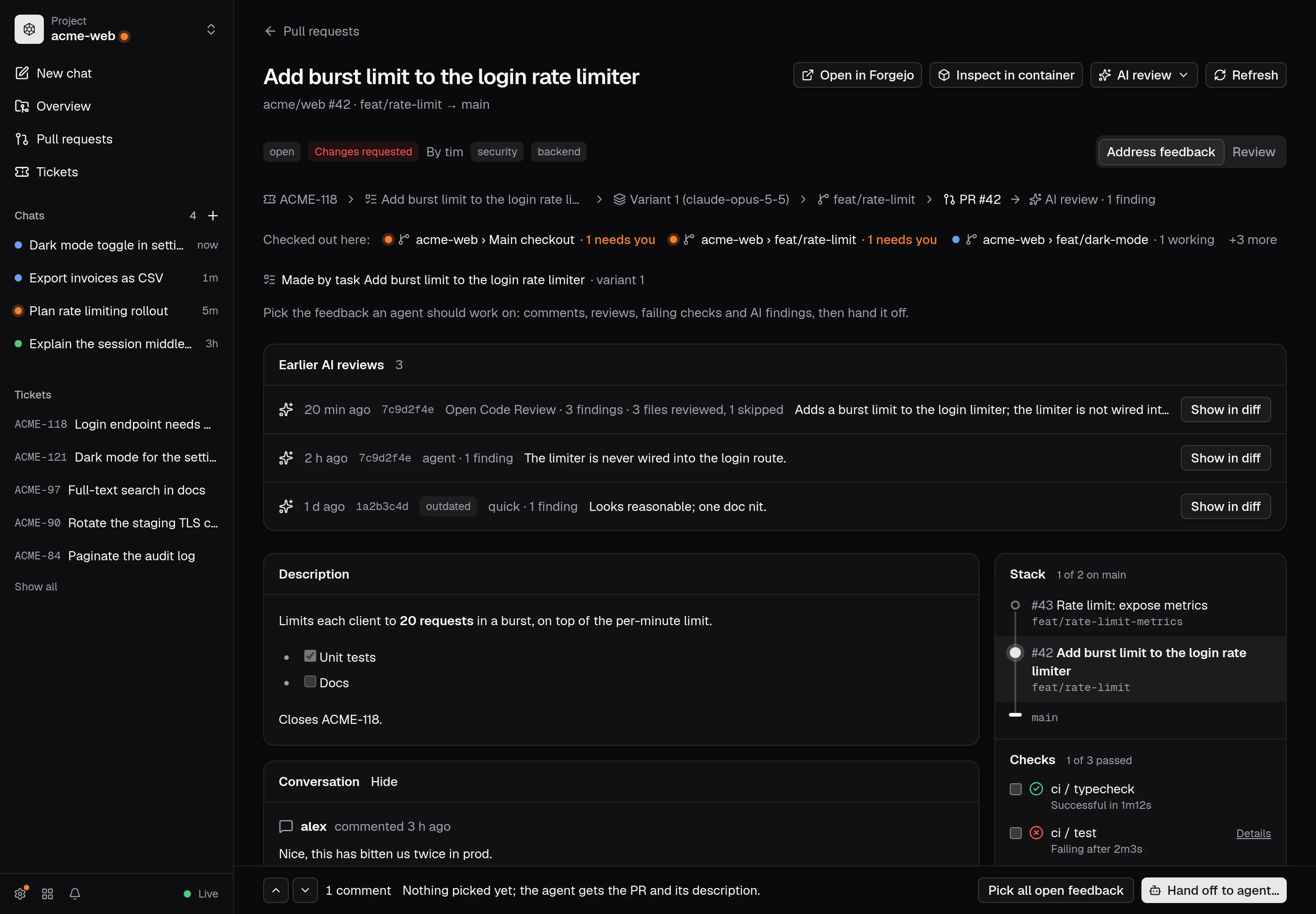
A PR page has two modes, switched at the top right and kept in the URL (?mode=address or ?mode=review):
- Address feedback: someone reviewed the PR and an agent should act on it. Tick comments, reviews, failing checks and AI findings with Add to handoff, or use Pick all open feedback in the bar at the bottom (unresolved comments, reviews that request changes or say something, failing checks, open AI findings). Hand off to agent… sends what you picked. The diff is read-only.
- Review: you review the PR. Comment on lines with the + in the gutter, run an AI review, and accept, edit or dismiss what it suggests. Submit review… sends your comments and summary to Forgejo. The conversation starts collapsed.
PRs opened from Review requested or Review all start in Review; everything else starts in Address feedback.
AI review
AI review offers these ways to review the PR's head commit:
- Agent review (the default) starts a session in a checkout of the PR: a matching local checkout, or a new worktree at the head commit. The agent reads the change and the code around it, may run tests, and changes nothing. When the session goes idle, the dashboard asks it for its findings as JSON. Collect findings now doesn't wait for that. The session stays around, so you can follow up in it.
- Quick review sends only the description and the diff to a new session in any running checkout of the repository, and returns findings straight away.
- Open Code Review reviews files in a checkout with a configured provider and suggests code changes. Set it up under Settings → Open Code Review, then choose it from the AI review menu. See Open Code Review.
A finding on a line the diff doesn't show moves to the nearest shown line within three lines, because Forgejo only accepts comments on lines in the diff. Findings that can't be placed, and findings about the PR as a whole, are listed under the AI review with its summary. In Review mode, Accept turns a suggestion into one of your draft comments (or adds a general one to the summary); in Address feedback mode, findings can go to the agent like any other feedback. The run and its findings are remembered in the browser for that PR and head commit, so a reload picks up where it left off; a new head commit starts over.
The diff supports syntax highlighting, a changed-files navigator, and unified or side-by-side layout. The selected layout is remembered. Metadata and discussion load independently of the diff, so a failed or oversized patch does not hide the PR context. Open in Forgejo remains available when requests fail.
Hand off to agent
Hand off to agent… opens an editable prompt containing the PR URL, head branch and commit, base branch, description, and selected feedback/check descriptions. The dashboard inspects running local projects' remotes and recorded publish URLs to suggest the matching repository and checkout, including worktrees published through AGit. You can also choose a project manually.
Choose a checkout and an existing session, or start a new session there. Sending to a running session queues the feedback behind its current turn. Create new task… opens the usual task form with the prompt and title filled in so you can choose a worktree, model, and environment. The prompt asks the agent to verify the PR commit before editing and fetch it with the project's git credentials into a separate worktree if necessary. The dashboard does not automatically switch or reset an existing checkout. A repository without a local project must be added first.
Refresh and caching
PR data uses a TanStack Query cache that is also saved in the browser's IndexedDB, so pages you visited in the last 24 hours reappear immediately, even after a reload, and refresh in the background. Diffs are kept in memory only. Stale data also refreshes when the window regains focus or the connection returns. Refresh keeps existing content visible during the request. Failed sections offer Retry; rate-limit errors ask you to wait before refreshing. Navigation cancels unused API requests, and cancellation is passed through to Forgejo. Changing saved connection settings, or upgrading opendevhub, clears the Forgejo query cache. Your token is never stored in the browser.
Saved settings
Settings survive restarts. The URL and token are kept separately from ordinary configuration, in ~/.config/opendevhub/integrations/forgejo.json (or under XDG_CONFIG_HOME). This file holds only the URL, enabled state, and an opaque credential reference. The token is stored in macOS Keychain, Windows Credential Manager, or Secret Service on Linux. Linux requires an unlocked persistent Secret Service, such as GNOME Keyring or KWallet, in your desktop session.
If the OS credential store is locked or unavailable, the operation fails with an actionable error. There is no plaintext or volatile-keyring fallback. Existing plaintext credentials are migrated before use; the plaintext token is removed from the file after secure storage succeeds. The saved token is never returned to the browser or injected into task containers.
A saved token shows as Token saved; Replace lets you paste a new one. Changing the URL requires a new token. Disabling retains the connection details; Remove token… removes the saved token and turns Forgejo off.
Read scopes are sufficient for browsing, agent handoff and AI review. Submit review… sends your inline comments and summary and lets you choose Comment, Approve, or Request changes. Submitting a review requires write:repository and write:issue scopes. Drafts are discarded when you leave the page or when a refresh brings in a new head commit. Reviews target the loaded commit; if it changes, refresh before submitting. Inspect in container checks out the PR's source branch in a worktree: it verifies the head commit and sets the matching source remote as the branch's upstream, so commits can be pushed to the PR. For a fork, add its repository as a remote in the local project first. Merging remains on Forgejo. Agent handoff uses opendevhub’s existing task/session APIs and does not give the Forgejo token to containers. Responses larger than 20 MiB cannot be displayed here. The existing Publish action continues to use your git credentials independently of this integration.
Local checkouts
A pull request's page lists the running checkouts of its branch under Checked out here, with how many agents there need you. The other way round, a checkout whose branch you published from opendevhub shows its pull request in the header; on your Forgejo it opens here.
Under a project's gear menu, Tickets and pull requests can link a Forgejo repository as owner/name. The project's sidebar then points its pull requests view at that repository. This link does not change the project's git remote.